UTM naming convention: rules that don't break your analytics
How to build UTM parameters for Google Ads, Meta, TikTok, email and messengers, with one standard for utm_source, utm_medium and utm_campaign, a builder sheet template, automated validation and normalisation in reports.
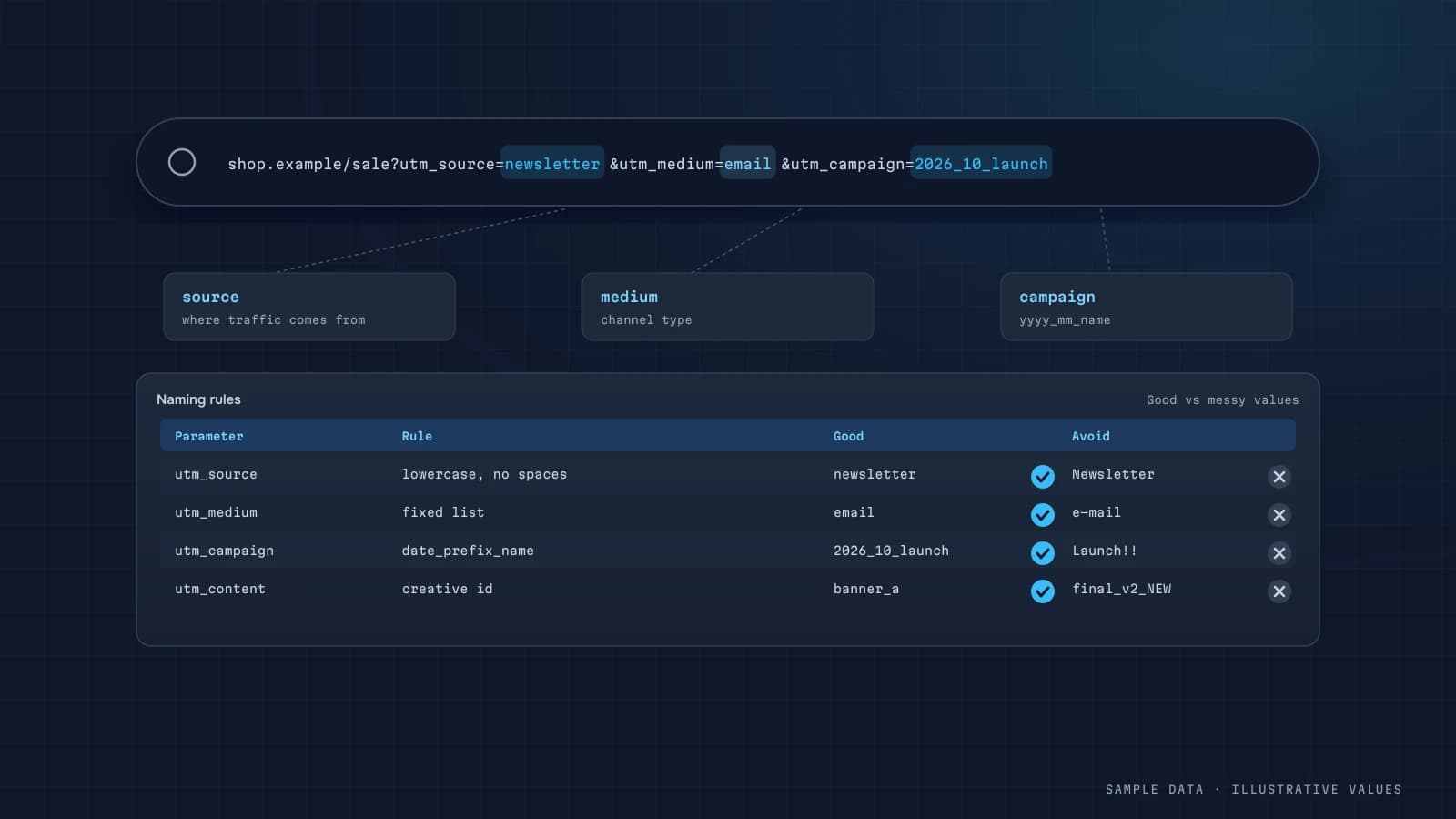
The cheapest way to wreck your analytics is messy UTMs. Instagram, instagram, ig, insta, facebook / paid, fb / cpc, and suddenly one channel shows up as six. Attribution, ROAS and budgets are then calculated from those strings. Here's the standard I put in place on projects, and how to make it stick.
The five parameters
| Parameter | Meaning | Example |
|---|---|---|
utm_source | where traffic comes from (platform) | google, facebook, instagram, tiktok, newsletter, linkedin |
utm_medium | type of traffic | cpc, paid_social, email, social, referral, affiliate |
utm_campaign | campaign | 2026-10_autumn-sale_us |
utm_content | ad variant / creative | video-15s_v2 |
utm_term | keyword or audience | lookalike-buyers-3pct |
GA4's default channel grouping uses source and medium, so utm_medium values have to fit its rules: cpc for paid search, email for email, and so on. Something like utm_medium=paid-insta will land the traffic in "Unassigned."
The rules
- Lowercase only. GA4 is case-sensitive, so
Facebookandfacebookare different sources. - No spaces, no special characters. Use hyphens within words and underscores between blocks.
- A fixed dictionary of sources and mediums. New values get added through the sheet only.
- One campaign naming template, such as
year-month_name_geo. Whatever you choose, everyone uses it. - Never tag internal links. It restarts the session with a new source.
- Use auto-tagging where it exists. For Google Ads, enable auto-tagging (
gclid) and treat UTMs as a supplement.
Example dictionary
| Channel | utm_source | utm_medium |
|---|---|---|
| Google Ads Search | cpc | |
| Meta Ads (Facebook) | paid_social | |
| Meta Ads (Instagram) | paid_social | |
| TikTok Ads | tiktok | paid_social |
| LinkedIn Ads | paid_social | |
| Newsletter | newsletter | |
| Influencer | creator-name | influencer |
| Affiliate | partner-name | affiliate |
Meta supports dynamic URL parameters ({{campaign.name}}, {{ad.name}}). They're convenient, but then your campaign names in Ads Manager must follow the same template.
A builder sheet
The most practical tool is a Google Sheet where the marketer picks source and medium from dropdowns, types a campaign name, and a formula assembles the URL. Data validation makes "Insta" impossible to enter.
=A2&IF(ISNUMBER(SEARCH("?",A2)),"&","?")&"utm_source="&B2&"&utm_medium="&C2&"&utm_campaign="&LOWER(SUBSTITUTE(D2," ","-"))Validation and normalisation
Mistakes still happen with a standard in place, so the pipeline gets a normalisation layer:
SELECT
  CASE
    WHEN LOWER(source) IN ('fb', 'facebook', 'm.facebook.com', 'l.facebook.com') THEN 'facebook'
    WHEN LOWER(source) IN ('ig', 'insta', 'instagram', 'l.instagram.com') THEN 'instagram'
    ELSE LOWER(source)
  END AS source_norm,
  LOWER(medium) AS medium_norm,
  COUNT(*) AS sessions
FROM sessions
GROUP BY 1, 2
ORDER BY sessions DESC;
The dashboard also gets a widget listing new, unknown source/medium values from the past week. When something odd shows up, marketing hears about it right away instead of at the quarterly review.
Edge cases
- Messengers (WhatsApp, Telegram, Slack) often send no referrer, so untagged links become "direct."
- Hosted payment pages (PayPal, Stripe Checkout, bank 3-D Secure) can overwrite the session source on return. Add them to GA4's unwanted referrals list.
- Offline QR codes: use
utm_medium=offline, withutm_sourceset to the placement. - Email platforms often append UTMs automatically. Make sure they match your dictionary.
How this connects to attribution
Store UTMs on the lead in your CRM via hidden form fields, and you can attribute orders and revenue by channel without depending on GA4 (attribution guide). For the combined report with spend, see the cross-channel ad reporting dashboard.
Checklist
- Source/medium dictionary approved
- One campaign naming template
- Builder sheet with validation
- Google Ads auto-tagging enabled
- Payment domains on the unwanted referrals list
- UTMs stored on the lead in the CRM
- Normalisation in the pipeline, plus alerts for new values
Step by step: rolling out a convention in a live account
Introducing rules into an account with years of messy tags is the hard part. The order that works:
- Audit what exists. Export the last 12 months of source/medium/campaign combinations with sessions and revenue. Usually there are dozens of spellings for the same thing (
facebook,Facebook,fb,m.facebook.com). - Write the allowed values for
utm_sourceandutm_mediumas a closed list. Campaign names follow a pattern, not a list. - Map the old values to the new ones in a lookup table, so historical reports become comparable.
- Switch new campaigns to the builder sheet from a fixed date and write that date down.
- Validate weekly and fix stray values at the source, not only in reports.
The campaign name pattern, with examples
A pattern I use for utm_campaign, lowercase with underscores between parts and hyphens inside parts:
{country}_{objective}_{audience}_{offer-or-theme}_{yyyymm}
| Situation | utm_source | utm_medium | utm_campaign |
|---|---|---|---|
| Meta prospecting, autumn sale | meta | paid_social | ua_conv_lookalike_autumn-sale_202610 |
| Google Search, brand | cpc | ua_conv_brand_core_202610 | |
| Newsletter, new arrivals | newsletter | ua_retention_subscribers_new-arrivals_20261015 | |
| Telegram channel post | telegram | social | ua_traffic_channel_guide-launch_202610 |
| Influencer | influencer | ua_awareness_creator-name_capsule_202610 |
The content parameter (utm_content) carries the creative or link position (video-15s-a, header-link), and utm_term stays for keywords or audience details. Keep parts in a fixed order so a campaign name can be split into columns in SQL.
SQL: normalising and splitting in the warehouse
Even with rules, some stray values slip through. Normalise in the clean layer:
SELECT
  LOWER(TRIM(utm_source))  AS source_raw,
  COALESCE(m.source_std, LOWER(TRIM(utm_source)))  AS source,
  COALESCE(m.medium_std, LOWER(TRIM(utm_medium)))  AS medium,
  LOWER(utm_campaign) AS campaign,
  SPLIT(LOWER(utm_campaign), '_')[SAFE_OFFSET(0)] AS camp_country,
  SPLIT(LOWER(utm_campaign), '_')[SAFE_OFFSET(1)] AS camp_objective,
  SPLIT(LOWER(utm_campaign), '_')[SAFE_OFFSET(4)] AS camp_month
FROM clean.sessions s
LEFT JOIN ref.utm_source_map m
  ON m.source_raw = LOWER(TRIM(s.utm_source));
A weekly check lists any source or medium not in the allowed list, with sessions, so whoever launched it can fix the link.
Common mistakes
| Mistake | Effect | Fix |
|---|---|---|
| UTMs on internal links | sessions restart, original source is overwritten | never tag links within your own site |
| Mixed case | Meta and meta become two rows | lowercase everything |
| Spaces in values | encoded as %20 or +, so the values split | underscores and hyphens only |
| Medium values outside GA4's channel rules | traffic lands in "Unassigned" | use mediums that fit GA4's default channel groups or define custom groups |
| Overriding auto-tagging | Google Ads cost and conversion data don't join | keep gclid auto-tagging on; add UTMs only if you need them elsewhere |
| Campaign names without dates | can't tell this year's sale from last year's | add yyyymm |
Offline, QR codes and messengers
UTMs work anywhere a link can be opened, which makes them useful beyond ads:
| Placement | Suggested tagging | Note |
|---|---|---|
| QR code on packaging | source=packaging, medium=qr, campaign=insert-card_202610 | use a short redirect so you can change the target later |
| Offline event or flyer | source=event-name, medium=offline, campaign=… | one link per placement if you want to compare them |
| Telegram/Viber/WhatsApp messages | source=telegram (etc.), medium=messenger or social | messenger in-app browsers often drop referrers, so without UTMs this becomes "direct" |
| Partner or affiliate | source=partner-name, medium=affiliate or referral | agree on the tags in the partner contract |
| Email signatures | source=email-signature, medium=email | small, but often surprisingly steady |
The rule stays the same: use values from the closed list, keep the pattern, and log the link in the builder sheet so whoever reads the report later knows what "insert-card_202610" was.
Who owns the convention
Assign one owner, usually the marketing lead, who approves new source or medium values and updates the builder sheet. Share the sheet with agencies and freelancers on day one, and make "links built in the sheet" part of every campaign brief. Conventions fail when they live in someone's head.
FAQ
Do I need UTMs on Google Ads?
With auto-tagging (gclid), GA4 identifies Google Ads campaigns on its own. You can add UTMs for your CRM and other tools, as long as they don't conflict with auto-tagging.
Why does my tagged traffic show as Unassigned?
Almost always because of a non-standard utm_medium. GA4's channel groups depend on specific medium values, so use those.
Can I fix historical data with bad UTMs?
Not inside GA4 reports. In BigQuery and in your dashboard, yes, through a normalisation table.
Do UTMs hurt SEO?
No, as long as you don't put them on internal links and your canonical URLs are set correctly.
DATUMPANEL — Business data analytics
DATUMPANEL is an independent data analyst based in Ukraine. I build dashboards for business owners, set up GA4 and the BigQuery export, and run data pipelines and Telegram auto-reports for e-commerce, service businesses, SaaS and agencies, from data audit to decisions.