Consent mode v2 and your analytics: what changes and how to cope
What consent mode v2 is, how basic and advanced modes differ, how declined cookies change your GA4 and ad platform data, and how to set up the banner so you stay compliant without losing your analytics.
If you have EU visitors or advertise on Google to European audiences, cookie consent isn't a formality. How your banner and consent mode are set up decides how much data GA4 and Google Ads actually get. What follows is a practical explanation, not legal advice. Check the specifics with counsel.
What consent mode is
Consent mode is how your site tells Google's tags what the user has agreed to. Google documents it in the Google Ads help center. The core signals:
| Signal | Controls |
|---|---|
analytics_storage | analytics cookies (GA4) |
ad_storage | advertising cookies |
ad_user_data | sending user data to Google for ads |
ad_personalization | personalised ads (remarketing) |
The last two arrived with consent mode v2. Google requires them for personalised ads served to EEA users.
Basic vs advanced mode
| Basic | Advanced | |
|---|---|---|
| Tags before consent | not loaded | loaded with restrictions |
| Data when declined | nothing | cookieless pings |
| Conversion modelling | limited | possible from pings |
| Complexity | simpler | needs careful QA |
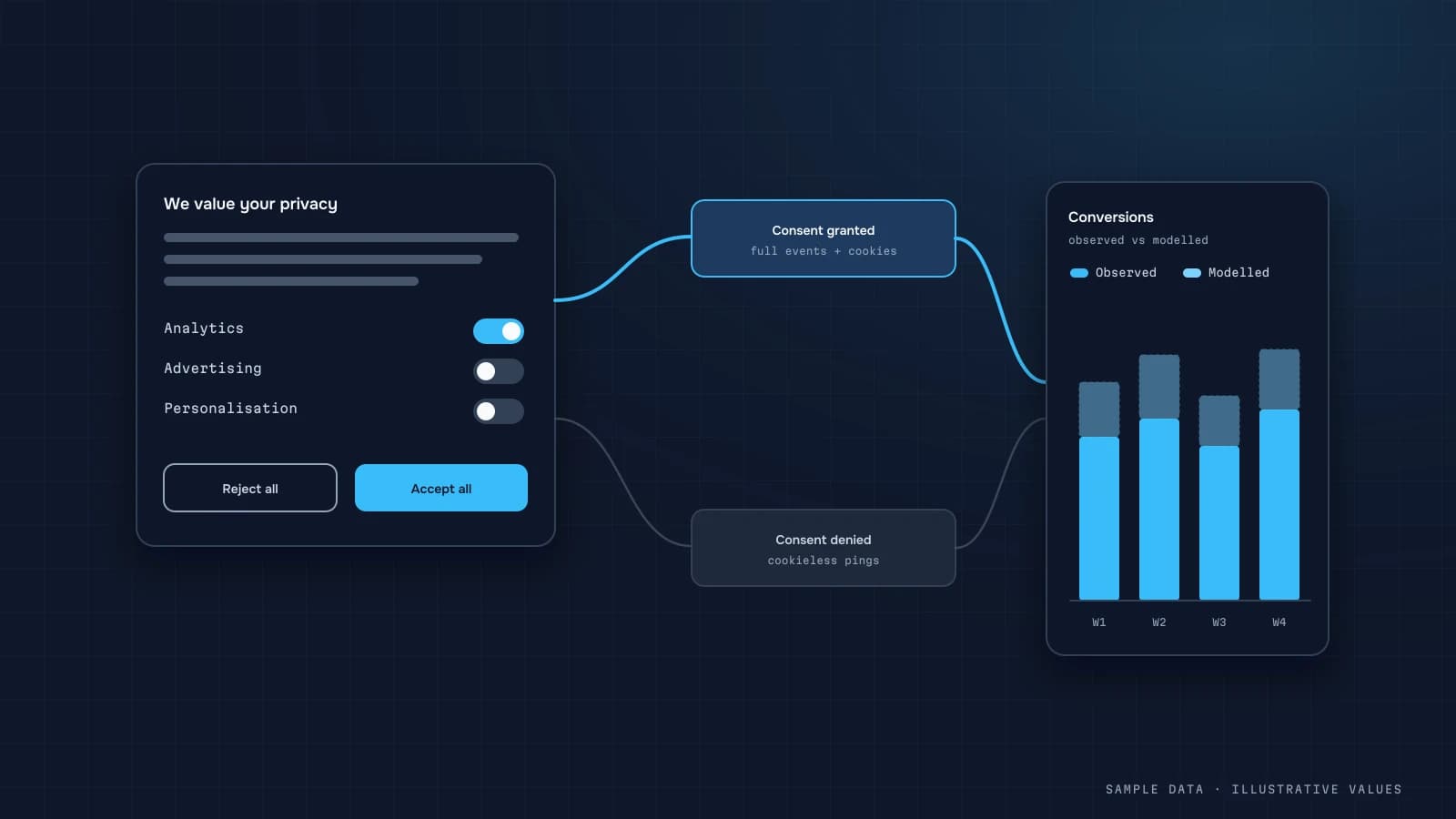
In advanced mode, GA4 and Google Ads can model part of the behaviour and conversions of users who declined. That means some of the numbers in your reports are estimates, not counts.
How it changes your data
- GA4 shows fewer sessions and users than actually visited, and some of what it shows may be modelled.
- The BigQuery export contains no modelled data, only what was actually collected. So BigQuery and the GA4 UI will differ (BigQuery export).
- Attribution gets weaker. Sessions from users without consent are harder to stitch together, so more traffic ends up unattributed.
- Ad platforms model conversions, which puts their numbers even further from your backend (GA4 vs CRM).
Setting it up properly
- A banner with equal-weight "Accept" and "Reject" buttons on the first layer. Many EU regulators expect this.
- Default state
deniedin regions that require consent, until the user chooses. - Send the consent update right after the click, with no reload.
- A consent management platform (CMP). Off-the-shelf options integrate with consent mode. A custom banner also works if it passes the signals correctly.
- Verify in Tag Assistant which tags fire before and after consent.
- Document it in your privacy policy: which cookies, why, and how to withdraw consent.
// default state before the user chooses
gtag('consent', 'default', {
  analytics_storage: 'denied',
  ad_storage: 'denied',
  ad_user_data: 'denied',
  ad_personalization: 'denied',
  wait_for_update: 500
});
// after "Accept"
gtag('consent', 'update', {
  analytics_storage: 'granted',
  ad_storage: 'granted',
  ad_user_data: 'granted',
  ad_personalization: 'granted'
});Making up for lost data, ethically
- Money comes from the backend. Revenue, orders and unit economics don't depend on cookies.
- First-party data. UTMs and source stored with the order or lead, within what your privacy policy allows.
- Server-side events for paid orders, with consent respected (server-side tracking).
- Aggregate metrics (MER, blended CAC) instead of trying to follow every user.
What to show on the dashboard
- the consented-session share, if you capture that signal, as a data-quality metric;
- a note that GA4 data is partly modelled;
- financial KPIs from the backend only.
Checklist
- Banner with equal "Accept" and "Reject"
- Default
deniedin consent regions - All four v2 signals are sent
- Tags verified in Tag Assistant
- Cookies described in the privacy policy
- Financial metrics come from the backend
- The team knows part of the GA4 data is modelled
Step by step: implementing consent mode v2
Consent mode uses four main signals: ad_storage, analytics_storage, ad_user_data and ad_personalization. The setup, following Google's consent mode documentation:
- Set defaults before any tag loads. In regions where consent is required, default everything to
denied. - Load your consent banner (CMP). Ideally use one that integrates with consent mode, so it sends the update for you.
- Send an update when the user chooses, and on every later page load from the stored choice.
- Verify in Tag Assistant that the default fires first and the update follows the choice.
<script>
  window.dataLayer = window.dataLayer || [];
  function gtag(){dataLayer.push(arguments);}
  gtag('consent', 'default', {
    ad_storage: 'denied',
    analytics_storage: 'denied',
    ad_user_data: 'denied',
    ad_personalization: 'denied',
    wait_for_update: 500          // ms to wait for the CMP before tags fire
  });
</script>
<!-- then the Google tag / GTM snippet, then the CMP -->
<script>
  // called by your banner when the user accepts analytics only
  function onConsent(choice) {
    gtag('consent', 'update', {
      analytics_storage: choice.analytics ? 'granted' : 'denied',
      ad_storage:        choice.ads ? 'granted' : 'denied',
      ad_user_data:      choice.ads ? 'granted' : 'denied',
      ad_personalization: choice.ads ? 'granted' : 'denied'
    });
  }
</script>
Region-specific defaults are possible with the region parameter if you serve markets with different rules. Have whoever is responsible for legal compliance confirm which rules apply to you.
Worked example: what consent rates do to your reports
Illustrative month, 100,000 visitors from markets with a consent banner:
| Choice | Share | Visitors | In GA4 reports (basic mode) |
|---|---|---|---|
| Accept all | 55% | 55,000 | fully measured |
| Analytics only | 10% | 10,000 | measured, no ad personalisation |
| Reject all / ignore | 35% | 35,000 | not measured |
In basic mode, GA4 sees 65% of visitors. If your order counts come from GA4, conversion rate stays roughly right (consenting users convert at a similar rate, though not necessarily the same one), but absolute orders, users and revenue are all about a third lower than reality. That's why money should come from the backend and GA4 should give shares and rates. In advanced mode, Google models some of the missing behaviour from cookieless pings, once your property meets its traffic thresholds for modelling.
Track your consent rate itself as a metric on the dashboard. A banner redesign or a CMP update can shift it by many points overnight, and every downstream number moves with it.
Verification checklist
- Defaults are set before GTM/gtag loads (check order in the page source)
- With "reject", no
_gacookie is created (basic mode) or tags send cookieless pings only (advanced) - With "accept", the update fires and cookies appear
- The choice persists across pages and visits
- Ad platform tags respect the same choice
- Withdrawing consent later works and is as easy as giving it
- Consent rate is tracked (from your CMP's statistics or a dedicated event)
Banner design: honest, not manipulative
Consent rates depend heavily on banner design, and it's tempting to push them up with dark patterns. Regulators and data protection authorities in many countries have published guidance against that (for example the EDPB guidelines on deceptive design patterns). Practical rules that keep you on the safe side and still give decent rates:
| Do | Avoid |
|---|---|
| "Accept" and "Reject" buttons equally visible on the first layer | a hidden or greyed-out reject option |
| Short, plain explanation of what analytics is used for | pre-ticked boxes |
| Granular choice (analytics, ads) on a second layer | repeated pop-ups after a rejection |
| A persistent link to change the choice later | blocking the site until the user accepts |
A clear, respectful banner tends to produce a stable consent rate you can plan around. A manipulative one invites complaints and can be forced to change, and then your consent rate drops overnight anyway.
What this means for the dashboard
Put a small note next to user and session metrics, such as "measured for consenting visitors, ~65% of traffic," and keep revenue on backend data. Owners accept partial measurement easily when it's explained. They lose trust when numbers drop for no stated reason.
FAQ
Do I need a cookie banner if I'm not in the EU?
If you have EU/UK users or advertise to them, in practice yes. Other jurisdictions have their own rules. Ask a lawyer about yours.
Why did GA4 sessions drop after we launched the banner?
Some users declined, so their visits aren't fully recorded. That's expected, not a bug.
Can I skip the banner and just avoid cookies?
You can use cookieless analytics, but GA4 and personalised Google ads need consent for EEA users.
Does modelled data appear in BigQuery?
No. The export only contains events that were actually collected, so BigQuery numbers are usually lower than the UI.

DATUMPANEL — Business data analytics
DATUMPANEL is an independent data analyst based in Ukraine. I build dashboards for business owners, set up GA4 and the BigQuery export, and run data pipelines and Telegram auto-reports for e-commerce, service businesses, SaaS and agencies, from data audit to decisions.